Amazon Product Fetcher – A Powerful WordPress Plugin by HTMLID.com
In the world of affiliate marketing, automation is key. Whether you’re running a content-driven blog, a product-focused niche site, or a large e-commerce platform, the ability to fetch, manage, and present affiliate products seamlessly can save countless hours of manual work. That’s exactly why HTMLID.com built the Amazon Product Fetcher – a robust WordPress plugin designed to connect your site directly with Amazon’s Product Advertising API (PA API).

This plugin empowers WordPress users to quickly import Amazon products by their ASIN (Amazon Standard Identification Number), store the essential data locally, and convert it into ready-to-publish content optimized for affiliate earnings.
In this article, we’ll take a deep dive into how the plugin works, what features it offers, why it’s a game-changer for affiliate marketers, and how you can start using it to boost your Amazon Associates revenue.
Why We Built Amazon Product Fetcher
As affiliate marketers ourselves, we at HTMLID.com noticed a recurring problem: managing Amazon products manually is time-consuming and prone to error. Copying titles, fetching images, checking availability, and creating affiliate links manually doesn’t just take hours – it also risks showing outdated or inaccurate product details to your visitors.
Amazon’s PA API solves this problem by providing real-time access to product data. However, working directly with the API requires technical expertise and complex coding skills. That’s where our plugin comes in – it simplifies the process for WordPress users, making Amazon’s data accessible and easy to publish.
With Amazon Product Fetcher, you don’t need to be a developer. All you need is your Amazon Associates PA API credentials and a WordPress site. From there, the plugin handles everything else: fetching product information, storing it in a custom database table, preparing it for publishing, and ensuring your affiliate ID is automatically included in all links.
How Amazon Product Fetcher Works
At its core, the plugin serves as a bridge between your WordPress website and Amazon’s Product Advertising API. Here’s a step-by-step look at how it works:
1. Setup & Configuration
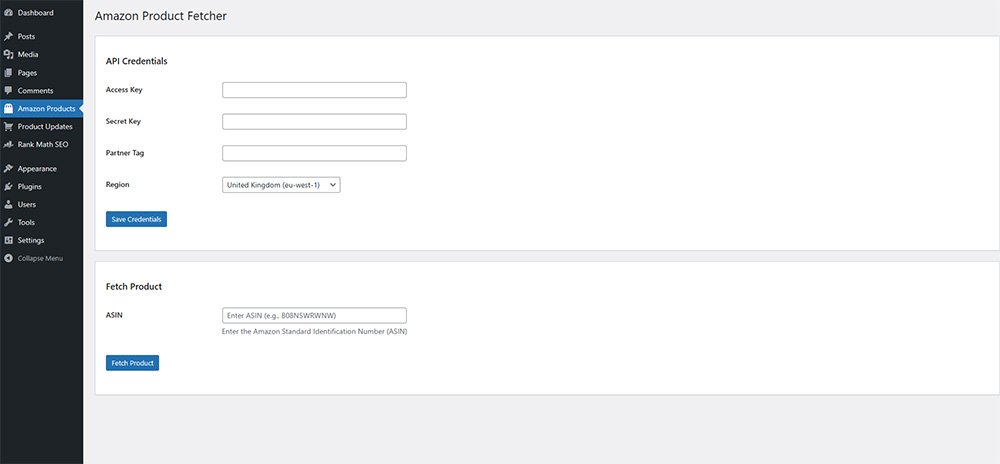
To use the plugin, you first need to have an Amazon Associates account. Once you’re approved, you’ll get access to the Product Advertising API. Amazon requires three key pieces of information:
- Access Key ID
- Secret Access Key
- Store ID (affiliate tracking ID)
These credentials are entered into the plugin’s settings page. Once saved, the plugin can securely connect to Amazon and start fetching data from the marketplaces you’re affiliated with.
2. Fetching Products via ASIN
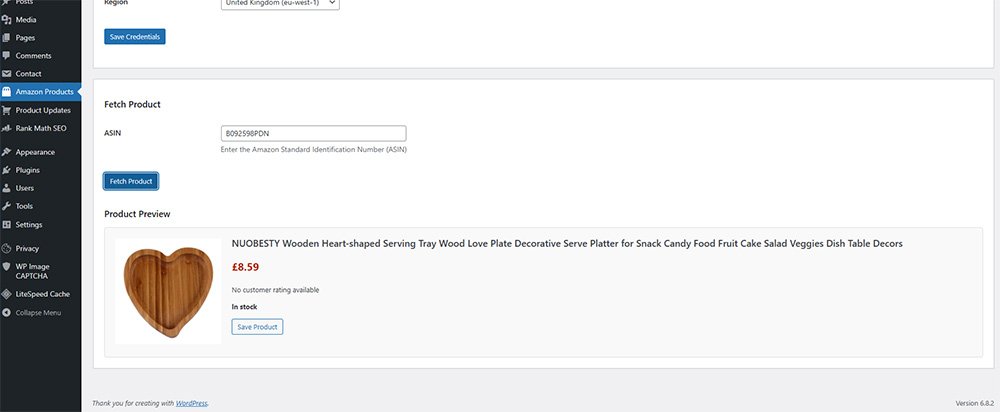
Each Amazon product has a unique ASIN (Amazon Standard Identification Number). With the plugin, you simply input the ASIN into the admin panel, and the plugin automatically calls the Amazon PA API to retrieve product data.
The fetched data includes:
- Product Title
- Main Image URL
- Product Price
- Availability (In Stock / Out of Stock)
In upcoming updates, we also plan to include:
- Customer Reviews
- Review Count
This ensures your WordPress site displays accurate, up-to-date information straight from Amazon.
3. Data Storage in a Custom Table
Unlike many lightweight plugins that rely solely on post meta, Amazon Product Fetcher uses its own dedicated database table called amazon_products. This ensures product data is stored in a structured way, making it faster to manage and easier to update.
This approach has multiple benefits:
- Keeps product data separate from your post content.
- Prevents bloating of your WordPress post meta table.
- Makes updates smoother and more reliable.
4. Converting Products into Posts
After fetching a product, you have the option to save it as a post draft. This gives you full control over how the product is presented on your site.
For example, you can:
- Change the title to make it SEO-friendly.
- Assign the post to one of your WordPress categories.
- Add your own custom description or product review.
- Use your favorite SEO plugin to optimize the post.
This way, the plugin doesn’t just create a product listing – it gives you a starting point for creating rich, unique content that ranks well in search engines and converts readers into buyers.
5. Data in Custom Fields
When the plugin creates a draft post, it also saves important product data into custom fields. These can be enabled in your WordPress editor, allowing you to use them however you like – in your theme, shortcodes, or custom templates.
The stored custom fields include:
- asin – the Amazon ASIN number.
- availability – In Stock or Out of Stock.
- image_product – direct URL of the product image from Amazon.
- affiliate_link – product link with your affiliate ID automatically appended.
- price – current product price.
This makes it incredibly flexible for developers and non-developers alike. You can display the data in product comparison tables, custom product grids, or anywhere else on your site.
Supported Amazon Marketplaces
Amazon operates in multiple regions, and affiliate programs differ by country. That’s why the plugin supports all major Amazon marketplaces. Depending on your affiliate account, you can connect to the relevant endpoint.
Here’s the full list of supported marketplaces:
- United States (
us-east-1,us-west-2) – www.amazon.com - United Kingdom (
eu-west-1) – www.amazon.co.uk - Germany (
eu-central-1) – www.amazon.de - Japan (
ap-northeast-1) – www.amazon.co.jp - Singapore (
ap-southeast-1) – www.amazon.sg - Australia (
ap-southeast-2) – www.amazon.com.au - Italy (
eu-south-1) – www.amazon.it - France (
eu-west-3) – www.amazon.fr - Brazil (
sa-east-1) – www.amazon.com.br
By covering these marketplaces, we ensure that affiliate marketers worldwide can use our plugin, regardless of where their audience is based.
Key Features at a Glance
Here’s a summary of what makes Amazon Product Fetcher stand out:
- Direct integration with Amazon PA API
- Fetch products by ASIN instantly
- Store product data in custom database table (
amazon_products) - Save products as draft posts for customization
- Custom fields for ASIN, price, availability, affiliate link, and image
- Supports multiple Amazon marketplaces worldwide
- SEO-friendly workflow with draft posts
- Automatically appends affiliate tracking ID
- Future updates planned for reviews and review counts
Benefits for Affiliate Marketers
So why should you use Amazon Product Fetcher instead of manually creating product listings or relying on other plugins? Here are the main benefits:
1. Save Time and Reduce Errors
No more copying and pasting product titles, links, and images. Everything is fetched directly from Amazon’s database.
2. Keep Data Accurate
Since data comes straight from Amazon, you’re less likely to show outdated prices or broken links.
3. SEO Flexibility
You still have full control over your post titles, descriptions, and categories – ensuring your content is unique and optimized.
4. Developer Friendly
Custom fields make it easy to create custom templates, product tables, or comparison pages tailored to your niche.
5. Scalable
Whether you want to pull 10 products or 10,000, the plugin is built to scale without cluttering your WordPress installation.
Future Roadmap
We’re constantly working on improving Amazon Product Fetcher. Some of the upcoming features include:
- ⭐ Customer Reviews Integration – display star ratings and review snippets.
- ⭐ Review Count – show how many reviews a product has received.
- ⭐ Automatic Updates – refresh product data periodically to reflect Amazon changes.
- ⭐ Bulk Import – fetch multiple products by entering a list of ASINs.
- ⭐ Shortcodes & Widgets – easily embed products anywhere in your content.
Who Should Use This Plugin?
The Amazon Product Fetcher is perfect for:
- Affiliate bloggers who review products.
- Niche site builders focused on Amazon products.
- Content creators who want to quickly add products to their posts.
- Web developers who build affiliate stores for clients.
- Anyone in the Amazon Associates program who wants to streamline product promotion.
Affiliate marketing is all about efficiency and accuracy. With Amazon Product Fetcher, we at HTMLID.com have created a plugin that makes working with Amazon’s Product Advertising API simple, reliable, and effective.
Instead of wasting time manually copying product details, you can now fetch them instantly, customize them for your audience, and publish affiliate-ready posts in minutes.
Whether you’re just starting out in affiliate marketing or managing a large portfolio of Amazon-focused websites, this plugin is designed to save you time, improve your accuracy, and increase your affiliate earnings.
👉 Download Amazon Product Fetcher now and supercharge your Amazon affiliate workflow.
Coming Soon: Amazon Product Updater
At HTMLID.com, we’re always thinking ahead to make affiliate marketing even easier. Alongside Amazon Product Fetcher, we’re currently developing a companion tool called Amazon Product Updater.
This will be a separate plugin designed to work seamlessly with Amazon Product Fetcher. While the Fetcher plugin focuses on pulling product data into your WordPress site, the Updater plugin will automatically keep that data fresh over time.
With Amazon Product Updater, you’ll be able to:
- 🔄 Automatically refresh product prices via the API.
- 🖼 Update images if Amazon changes them.
- 📦 Keep availability statuses accurate (In Stock / Out of Stock).
This means you won’t just import products once – you’ll always have updated product information, keeping your site reliable and trustworthy for your visitors.
The Amazon Product Updater plugin will be released very soon, and we can’t wait to share it with you.